
Transfers
Open the transfer composer on an active call with Mod+Shift+T or the Transfer button, then enter a number or pick a BLF key.
Blind transfer
Choose Transfer now: Siple sends the call to the target immediately and the call ends on your side. By default pressing Enter in the composer starts a consult instead; set [ui] transfer_enter = "blind" to make Enter a blind transfer.
Attended transfer
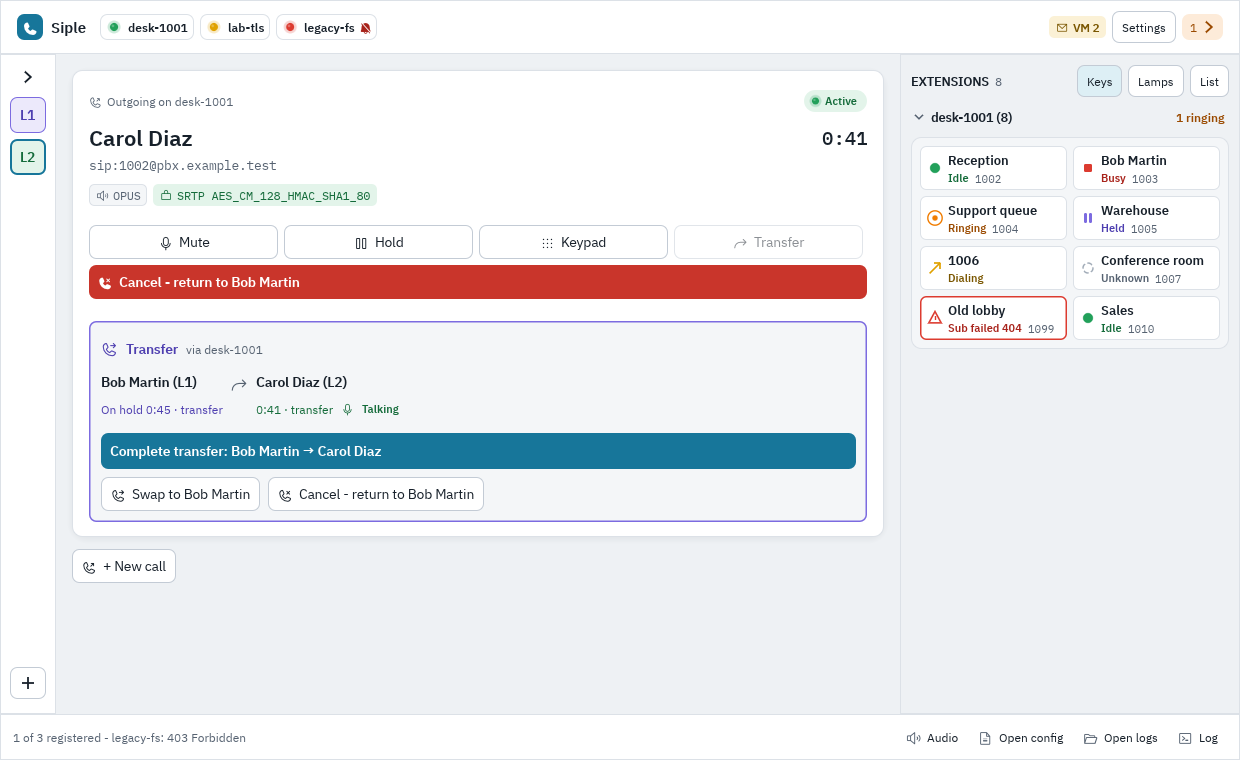
Choose Consult first. Siple holds the original caller (A) and calls the target (B). The transfer session shows what you can do at each stage:
| Stage | Actions |
|---|---|
| Consult dialing or ringing | Transfer now (blind) or Cancel, returning to A. Complete becomes available when B answers. |
| Consult connected | Complete transfer (A to B); Swap between A and B to speak to either; Cancel. |
| Consult failed | Cancel returns to A. |
After a transfer that fails for good, [calls] resume_after_failed_transfer (on by default) takes the original call off hold again. A transfer with no result after 32 s is never resumed automatically. The same session works for the GUI, the API and agents, because transfer sessions live in the engine.
You can also be the transferee: when the far end transfers you, the call follows. Details of every state are in the API reference.
Next: Extensions and BLF.